
Personal robotics. Physical ownership.↓
A hardware wallet.
With a body.
Pincer1 is a six-legged companion for traders, founders and families who hold crypto at home. It sees and hears its owner, explains each transaction, and requires a physical touch for ordinary signing. Solana first, with a chain-agnostic architecture.
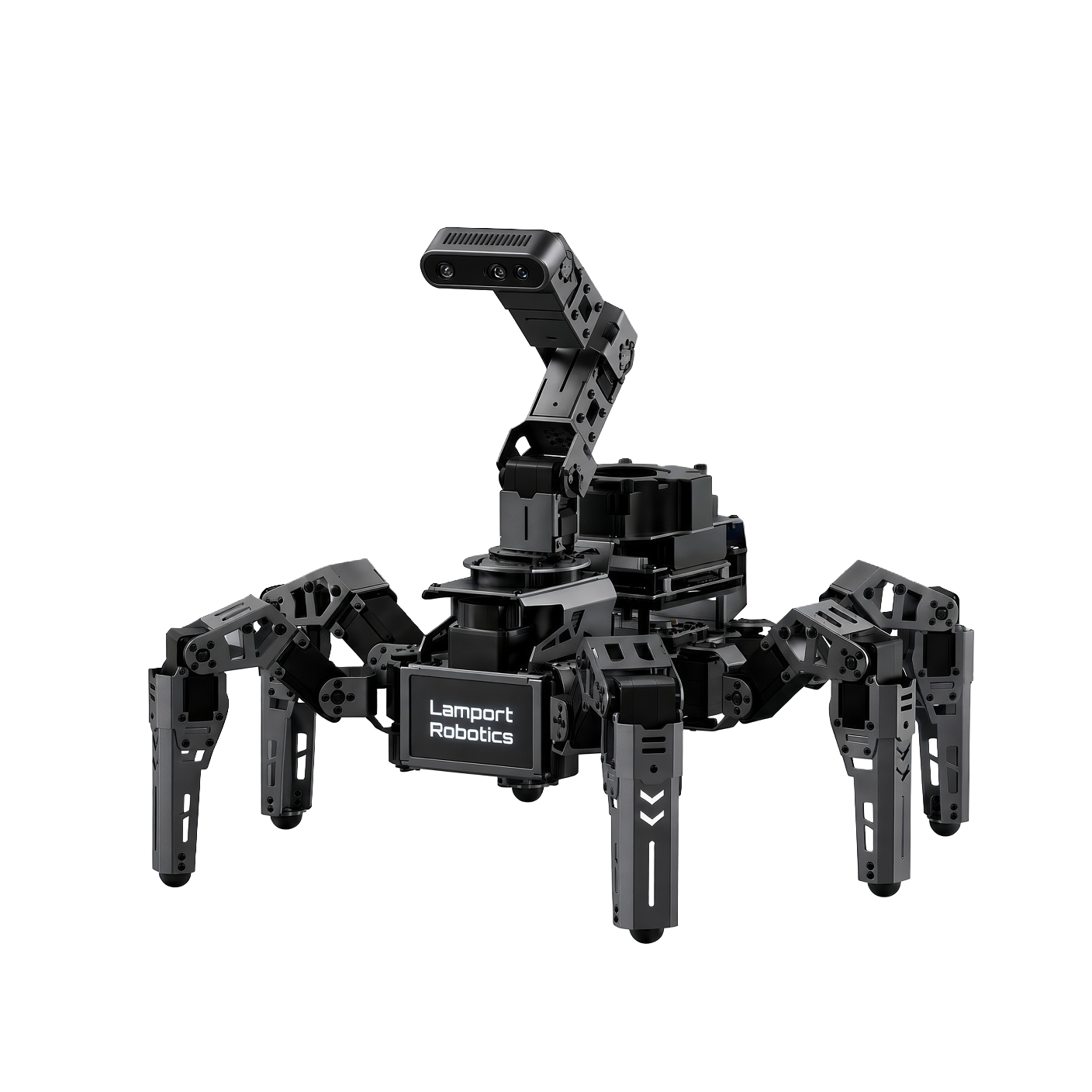 Pincer1 / Black & graphite
Your keys.
In the machine.
- Key custody
- NXP SE050 secure element
- Physical approval
- RP2350 consent controller
- First ecosystem
- Solana
Black & graphite. Solana first.
Pincer1 presale ↗A wallet that can
see, hear and explain.
See the request. Hear the details. Touch to approve. Pincer1 brings the signing decision into the room, with dedicated hardware between your apps and your keys.
01Presence-gated approvalFour checks before ordinary signing.+
Pincer1 combines lidar presence detection, face matching with moving-viewpoint liveness checks, a spoken passphrase with speaker verification, and a physical touch.
- 01Presence
Lidar looks for a three-dimensional person in the room.
- 02Face
The moving depth camera checks the enrolled owner.
- 03Voice
A passphrase is checked against the owner’s voice.
- 04Touch
A dedicated input goes directly to the RP2350.
Presence models run on the untrusted Jetson. The controller’s transaction checks and dedicated touch input form the signing boundary.
02Transaction readingHear what you are about to approve.+
The robot explains the amount, destination and available address history aloud and on its 4.3-inch display. The controller independently parses the transaction bytes and compares them with the main computer’s claims. Hidden instructions, authority changes and unlimited approvals are flagged.
“0.5 SOL to an address created 3 days ago with no history.”Illustrative transaction explanation.
03Scam filteringReview the request before it reaches your keys.+
The software checks for drainer patterns, address poisoning, fake airdrops, malicious delegations and unfamiliar programs. Refusal policies are implemented on the consent controller as well as in the interface. The owner remains the final authority on correctly disclosed risks.
Scam filtering does not guarantee that every harmful transaction will be detected.
04Approval for appsConnect the browser. Confirm on the robot.+
The Chrome extension registers Pincer1 as a Solana wallet alongside options such as Phantom and Solflare. It forwards requests to the robot for explanation, policy checks and physical approval. The extension is treated as untrusted input.
05Duress modeA separate response when something is wrong.+
A designated expression or hidden word opens a low-balance decoy wallet, locks the real wallet and issues a silent alert. Lifting, bagging or losing sight of the owner closes the active signing session.
06A companionConversation with a physical presence.+
Pincer1 talks, listens, remembers and responds when called, with a personality its owner can shape. Choose a local language model or an optional Claude connection for conversation. Camera and microphone perception runs locally.
Cloud conversation is optional and selected by the owner.
07Secure-element custodyKeys and approval have dedicated hardware.+
Pincer1 keeps signing keys inside an NXP SE050, with an Ed25519 signing path for Solana, and connects it to signed controller firmware over an encrypted channel. A rhythm-based PIN is checked inside the chip with a five-attempt limit. Setup includes a 24-word recovery phrase, shown once and intended for offline storage.
The recovery phrase is a separate backup secret; anyone who obtains it may bypass the robot.
Designed as
a complete system.
A robotics platform built around a Jetson Orin Nano Super, a four-axis camera arm and an aluminium hexapod chassis.
An articulated point of view.
A Luxonis OAK-D Lite stereo depth camera sits on a four-axis arm. The moving viewpoint supports face and liveness checks; a RPLIDAR C1 supplies room and presence data.
One computer can ask.
One controller can approve.
The Jetson and browser extension are treated as untrusted. The RP2350 parses transaction bytes itself, checks the claims and controls the only connection to the secure element. Ordinary signing requires its dedicated touch input.
The untrusted computer.
The Jetson runs networking, transaction explanations, face and voice models, and the agent. It is treated as potentially compromised and has no direct authority to request a signature from the chip.
The controller re-parses transaction bytes and rejects understated claims. Pincer1 pairs signed firmware and secure boot with an encrypted SE050 channel, using channel keys provisioned into RP2350 one-time-programmable memory.
Physical consent, with explicit exceptions.
Ordinary transactions require a touch. The optional overnight agent uses a budget granted on the controller by a long touch, with automatic expiry. Optional inheritance uses a transaction signed in advance and a controller-held timer. These are separate, owner-enabled flows.
What the model does not cover.
A stolen recovery phrase, or an owner who approves a correctly warned harmful transaction, remains outside the protection model. Sensor checks and optional behaviors are not equivalent to chip-level key protection.
NXP describes the SE050 family as Common Criteria EAL6+ certified up to OS level. This is a component certification, not certification of Pincer1. NXP component information ↗
Hardware overviewView the specified components +
- Body
- Hexapod; 18 feedback serial-bus servos; 3 mm aluminium plates
- Arm & camera
- Four-axis arm; Luxonis OAK-D Lite stereo depth camera
- Front display
- 4.3-inch IPS; transaction amount and destination
- Main computer
- NVIDIA Jetson Orin Nano Super 8 GB; encrypted NVMe; secure boot
- Consent module
- Raspberry Pi Pico 2 / RP2350; SE050; dedicated capacitive touch; radio relay
- Sensors
- Slamtec RPLIDAR C1 360° 2D lidar; IMU; four-microphone array; speakers
- Power
- 3S Li-ion 21700 pack, approximately 200 Wh
- Estimated runtime
- 4–5 hours active; 10+ hours standing watch
- Optional dock
- Underbody pogo contacts; floor plate; battery monitoring
- Initial ecosystem
- Solana; chain-agnostic design
- Recovery
- 24-word backup phrase at setup; offline storage required
- Availability
- View presale information ↗
More capable.
Only when you choose.
Each option is enabled individually by the owner. Optional capabilities stay off until you choose them, and cannot be activated remotely.
Room lock+
Use lidar room fingerprints or a home map to allow signing only in an enrolled location.
Two-person rule+
Above an owner-defined threshold, require two enrolled people to be present, using body counting and face matching.
Offline payments+
Prepare durable-nonce transactions without a network. Show a signed transaction as a QR code or retain it for later broadcast, subject to nonce validity.
Air-gap relay+
Physically switch radio power according to presence or an owner-authorised agent window.
Inheritance / dead-man’s switch+
Pre-sign a transfer to a named heir. A timer on the consent controller tracks powered time and resets its proof-of-life state only on the owner’s touch, with advance warnings.
Wake-up alarm+
Set an asset or portfolio threshold: “If my holdings drop 15%, wake me.” The robot finds you and escalates the alert until touched, or rings your phone when you are away. Quiet hours are owner-controlled.
Mapping & navigation+
Map the home with lidar, name rooms while standing in them, and navigate between them.
Charging dock+
Return to the dock below 20% charge, then leave at 90% or when called. Uses underbody pogo contacts and a floor plate.
Overnight agent+
Grant a budget with a long touch before bed. The agent monitors portfolio and smart-money activity, executes within the controller-authorised allowance, and presents larger proposed moves in a morning report. Allowances expire automatically; keys remain in the secure element.
Know what holds
your keys.
Explore the systems behind Pincer1, from the physical consent controller to the companion software.
Our open-source repository brings together firmware, robot software, the browser extension, hardware documentation, protocols and the security model.
Explore the repository ↗Lamport Robotics
A lamport is the smallest unit of SOL. Our name also nods to Leslie Lamport’s work on distributed systems. We build physical machines around digital ownership.
Read the code and security model ↗Pincer1.
At home with you.
First edition.
Presale coming soon.